
01 / What it is
The numbers in your menu bar, for your agents.
Usage HUD tracks how much of each AI coding plan you’ve used: Claude, Codex, Gemini, Grok and local models. The same numbers the panel shows reach your agents three ways, all built into the app:
- A command line.
status,room,lane,spendandactivityprint a short answer, or JSON with--json. - An MCP server.
mcpspeaks the Model Context Protocol over stdio, so Claude Code, Codex, Gemini CLI, Cursor and other MCP clients can call it. - A setup prompt. Paste it into one agent session and that agent connects the rest.
Everything is read-only, works when the app is closed, and says how old each reading is. There’s nothing extra to install.
Where it lives
The command line is the app’s own executable. The path has a space in it, so quote it:
'/Applications/Usage HUD.app/Contents/MacOS/CodexUsageHUD' statusThis page writes usage-hud for that path. To type it the same way, add an alias to your shell profile:
alias usage-hud="'/Applications/Usage HUD.app/Contents/MacOS/CodexUsageHUD'"02 / Set up
One paste connects them all.
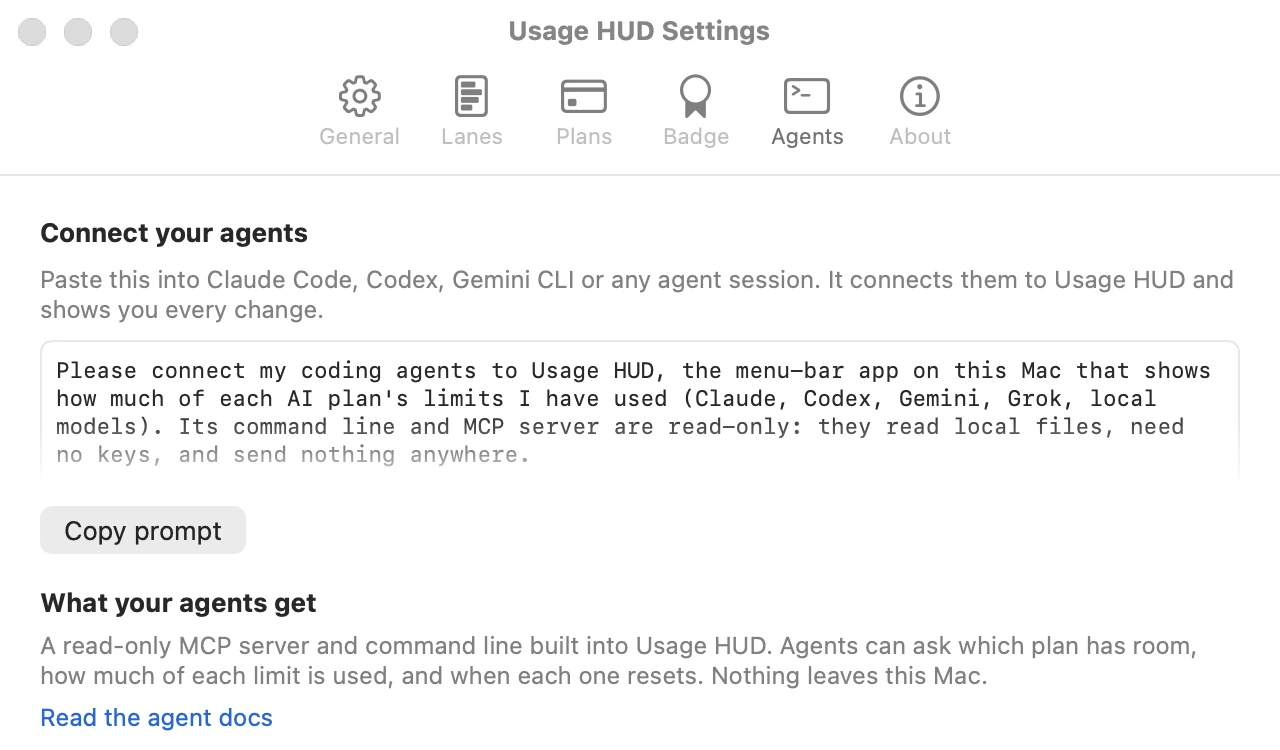
- Open Usage HUD Settings, then the Agents tab, and click Copy prompt. From a terminal,
usage-hud promptprints the same text. - Paste it into a Claude Code, Codex, Gemini CLI or Cursor session. One agent is enough.
- The agent checks that Usage HUD answers, adds the
usage-hudMCP server to each agent tool it finds, asks before it adds a two-line rule to your agents’ instructions, then shows you every change it made.
Restart open agent sessions afterwards so they load the new server.
Read the whole prompt
The prompt the app copies uses this Mac’s real paths. Here, ~ stands for your home folder.
Please connect my coding agents to Usage HUD, the menu-bar app on this Mac that shows how much of each AI plan's limits I have used (Claude, Codex, Gemini, Grok, local models). Its command line and MCP server are read-only: they read local files, need no keys, and send nothing anywhere.

The Usage HUD command on this Mac:
'/Applications/Usage HUD.app/Contents/MacOS/CodexUsageHUD'

1. Check that it works by running:
   '/Applications/Usage HUD.app/Contents/MacOS/CodexUsageHUD' status
   It should print one line per plan. If it says there are no readings yet, tell me to open Usage HUD and click Set up, and stop.

2. Add the MCP server, named usage-hud, to each agent CLI installed here. Run `command -v claude codex gemini` and skip any that are missing. If an agent already has a server named usage-hud, leave it alone.
   - Claude Code. Check: claude mcp get usage-hud
     Add: claude mcp add --scope user usage-hud -- '/Applications/Usage HUD.app/Contents/MacOS/CodexUsageHUD' mcp
   - Codex. Check: codex mcp get usage-hud
     Add: codex mcp add usage-hud -- '/Applications/Usage HUD.app/Contents/MacOS/CodexUsageHUD' mcp
     If `codex mcp` does not exist, append this to ~/.codex/config.toml instead:
     [mcp_servers.usage-hud]
     command = "/Applications/Usage HUD.app/Contents/MacOS/CodexUsageHUD"
     args = ["mcp"]
   - Gemini CLI. Check: gemini mcp list
     Add: gemini mcp add --scope user usage-hud '/Applications/Usage HUD.app/Contents/MacOS/CodexUsageHUD' mcp
     If that fails, add this entry inside "mcpServers" in ~/.gemini/settings.json, keeping everything already there:
     "usage-hud": { "command": "/Applications/Usage HUD.app/Contents/MacOS/CodexUsageHUD", "args": ["mcp"] }
     Gemini CLI starts MCP servers only in folders I have trusted, so `gemini mcp list` may show it as disabled here.
   - Cursor. If ~/.cursor exists, add the same entry inside "mcpServers" in ~/.cursor/mcp.json, keeping everything already there.

3. Ask me: "Add a two-line Usage HUD rule to your agents' global instructions?" Only if I say yes, append these two lines to the file of each agent you set up (create the file if it is missing, and skip it if the lines are already there): ~/.claude/CLAUDE.md for Claude Code, ~/.codex/AGENTS.md for Codex, ~/.gemini/GEMINI.md for Gemini CLI.
   - Before long or parallel work, check Usage HUD: call the usage-hud MCP tool which_plan_has_room, or run '/Applications/Usage HUD.app/Contents/MacOS/CodexUsageHUD' room
   - If your plan is running hot or nearly out, tell the user and name the plan that has room.

4. Show me every change you made: each command you ran and its result, and each file you edited with the exact lines you added. Then tell me to restart any open agent sessions so they load the new server.

To undo later: claude mcp remove --scope user usage-hud; codex mcp remove usage-hud; gemini mcp remove --scope user usage-hud; then delete the two lines.
03 / MCP tools
Five tools, all read-only.
Run usage-hud mcp and the server reads JSON-RPC 2.0 from stdin, one message per line, and writes one reply per line to stdout. Every tool is marked readOnlyHint: true and openWorldHint: false.
| Tool | Input | Returns |
|---|---|---|
usage_status | none | Every plan: percent used, window, pace against the clock, reset time, forecast empty time when running hot, confidence and reading age. The full agent summary. |
which_plan_has_room | none | The verdict for your main plan, the plan with the most room now (or null), one sentence of advice, and every usable plan, least used first. |
lane_detail | {"provider": "claude"} | One plan with every window: 5-hour, weekly, daily and model-limited weeks. |
spend_summary | none | API value per plan and in total (today, 7 days, 30 days), the plan price you pay, and the value multiple. Always marked not billed. |
recent_activity | none | Sessions active today and in the last 5 hours: tool, project folder name, model, tokens, API value, burn rate, and the top burner now. |
Each result carries a plain sentence, the same data as JSON text, and structuredContent for clients on MCP 2025-06-18 or later. The first three tools also declare an outputSchema.
When agents should call it. Call which_plan_has_room before long, expensive or parallel work and before spawning subagents. If the verdict is WATCH or STOP, tell the user and name the plan with room. If a lane says stale: true, say the reading is old. When quoting spend_summary, say API value isn’t billed.
Example: which plan has room
→ {"jsonrpc":"2.0","id":1,"method":"initialize","params":{"protocolVersion":"2025-11-25","capabilities":{},"clientInfo":{"name":"example","version":"1"}}}
← {"id":1,"jsonrpc":"2.0","result":{"capabilities":{"tools":{"listChanged":false}},"protocolVersion":"2025-11-25","serverInfo":{"name":"usage-hud","title":"Usage HUD","version":"1.3.0"},…}}
→ {"jsonrpc":"2.0","method":"notifications/initialized"}
→ {"jsonrpc":"2.0","id":2,"method":"tools/call","params":{"name":"which_plan_has_room","arguments":{}}}
← {"id":2,"jsonrpc":"2.0","result":{"content":[{"type":"text","text":"Claude: running hot. Move long or parallel work to Codex: 12% of its week used, on pace, resets in 6d 2h."},…],"isError":false,"structuredContent":{"verdict":{"mode":"WATCH",…},"roomNow":{"lane":"codex",…},…}}}
Example: what it’s worth, and what’s burning it
This week: $88 API value · you pay $28 of $120/mo · 3.2× value
Claude · $23 today · $85 week · $85 30 days · plan Max 5x $100/mo (detected)
Codex · $2.23 today · $2.95 week · $2.95 30 days · plan ChatGPT Plus $20/mo (user)
API value is what these tokens would cost at pay-per-use API prices; it is not billed. Plan prices are what the user pays per month.Top burner now: Claude · storefront · $3.64/h
Claude · storefront · claude-opus-5-5 · last active 8m ago · 40.9M tokens · $22 API value
Codex · mobile-app · gpt-6-sol · last active 12m ago · 3.2M tokens · $2.23 API value
Claude · api-server · claude-sonnet-5 · last active 1h ago · 1.1M tokens · $0.47 API valueExamples come from the app’s test data.
Protocol versions
- Modern clients (MCP
2026-07-28) send_metawithio.modelcontextprotocol/protocolVersionon each request; no handshake needed.server/discoverworks, andtools/listcarriesttlMsandcacheScope. - Legacy clients send
initialize. The server accepts2025-11-25,2025-06-18,2025-03-26and2024-11-05, echoes the version you ask for, and otherwise answers2025-11-25. - Errors: an unknown tool is
-32602, an unknown method-32601, a line that isn’t JSON-32700, and an unsupported modern version-32022with the supported list indata.supported. An untracked provider inlane_detailreturnsisError: truewith a sentence that says why.
04 / Register by hand
Rather do it yourself? Three commands.
The setup prompt runs these for you. Quote the path.
# Claude Code (user scope, every project)
claude mcp add --scope user usage-hud -- '/Applications/Usage HUD.app/Contents/MacOS/CodexUsageHUD' mcp

# Codex
codex mcp add usage-hud -- '/Applications/Usage HUD.app/Contents/MacOS/CodexUsageHUD' mcp

# Gemini CLI (user scope; servers start only in trusted folders)
gemini mcp add --scope user usage-hud '/Applications/Usage HUD.app/Contents/MacOS/CodexUsageHUD' mcp
Or edit the config file. For Codex, ~/.codex/config.toml:
[mcp_servers.usage-hud]
command = "/Applications/Usage HUD.app/Contents/MacOS/CodexUsageHUD"
args = ["mcp"]
For Gemini CLI or Cursor, inside "mcpServers" in ~/.gemini/settings.json or ~/.cursor/mcp.json:
{
  "mcpServers": {
    "usage-hud": {
      "command": "/Applications/Usage HUD.app/Contents/MacOS/CodexUsageHUD",
      "args": ["mcp"]
    }
  }
}
05 / Command line
Short answers, or JSON.
| Command | What it prints |
|---|---|
status | The verdict, the plan with the most room, and one line per plan. --json gives the full agent summary. |
room | One line: which plan has room right now. --json adds the verdict, advice and every usable plan. |
lane <provider> | One plan in detail, every window. Providers: claude, codex, gemini, grok, local; names like "Claude Code" work too. |
spend | API value (not billed) and plan cost, per plan and in total. |
activity | Recent agent sessions: project, model, tokens, API value, burn rate. |
prompt | The setup prompt with this Mac’s paths. |
mcp | Runs the MCP server on stdin and stdout. |
schema | The JSON Schema for status --json. |
help, --version | Help, and the version with the agent schema and MCP versions. |
$ usage-hud status
WATCH  Claude: running hot. Codex has room, 12% used.
Room now: Codex, 12% of its week used, on pace, resets in 6d 2h.

Claude        week   62%  running hot   resets in 5d 19h · empty ~8:25 AM · official, 4m old
Codex         week   12%  on pace       resets in 6d 2h · official, 4m old
Gemini        week   15%  room to spare resets in 18h · official, 2h old
Local Models  -        -  pace unknown  Local models have no plan limit; this lane counts tokens only.

$ usage-hud room
Codex has the most room now: 12% of its week used, on pace, resets in 6d 2h.
Sample output from test data.
Exit codes
| Code | Meaning |
|---|---|
0 | Success. For room: a plan has room now. |
1 | room only: no plan clearly has room right now. |
2 | Usage error: unknown command, flag or provider. |
3 | No readings yet. Open Usage HUD and click Set up. |
So a script can wait for room before it starts:
usage-hud room && ./start-the-long-job.sh06 / JSON fields
A stable shape your scripts can lean on.
status --json and usage_status return the same object, with schemaVersion: 1. New fields can appear without a version change; a removed or renamed field bumps the version. Every documented key is always present, with null when a value is unknown.
{
  "schemaVersion": 1,
  "generatedAt": "2026-10-01T20:54:01Z",
  "app": { "name": "Usage HUD", "version": "1.3.0" },
  "verdict": { "mode": "WATCH", "lane": "claude", "laneName": "Claude",
               "sentence": "Claude: running hot. Codex has room, 12% used." },
  "roomNow": { "lane": "codex", "laneName": "Codex", "window": "week", "usedPercent": 12,
               "pace": "on_pace", "resetsAt": "2026-10-07T22:54:00Z", "resetsIn": "6d 2h" },
  "lanes": [
    {
      "provider": "codex", "name": "Codex", "window": "week", "usedPercent": 12,
      "resetsAt": "2026-10-07T22:54:00Z", "resetsIn": "6d 2h",
      "pace": "on_pace", "status": "ON PACE", "forecastEmptyAt": null,
      "confidence": "official", "source": "official API",
      "readingAgeSeconds": 240, "readingAge": "4m", "stale": false, "note": null,
      "windows": [
        { "window": "5h", "scope": null, "usedPercent": 4, "pace": "room", "state": "live", … },
        { "window": "week", "scope": null, "usedPercent": 12, "pace": "on_pace", "state": "live", … }
      ]
    }
  ]
}
Verdict
mode | Meaning |
|---|---|
GO | Fresh reading, within budget, not running hot. |
WATCH | Over the comfortable band, or running hot. Conserve or move work. |
STOP | Nearly out, or spent until reset. |
CHECK | The reading is over 15 minutes old, or there’s no data. Don’t trust the number. |
roomNow is the plan with the most room, or null. A plan qualifies when its reading is under 30 minutes old, it isn’t spent, nearly spent or tight on its 5-hour window, and it’s under 60% used. Local models never qualify.
Plan fields
| Field | Meaning |
|---|---|
window | The headline window: 5h, week or day. A 5-hour window at 95% or more takes over, because it decides whether the plan works right now. |
usedPercent | Percent of that window used, or null when expired or unknown. |
resetsAt, resetsIn | ISO 8601 reset time and the time left, like "2h 10m". |
pace | on_pace, running_hot, room, almost_spent, spent or unknown. |
forecastEmptyAt | When the window runs out at the current pace. Set when running hot. |
confidence | official (the provider reported it), measured (read from local provider events), estimated or unknown. |
readingAge, stale | How old the reading is; stale is true past 30 minutes or when it’s missing. |
windows | Every window the plan reports, each with its own pace and state. scope names a model-limited week. |
How pace works. Pace compares the share of the window you’ve used with the share of time that has passed. More than 15 points ahead of the clock is running_hot; more than 15 behind is room; 90% used is almost_spent; 99.5% is spent.
Spend and activity
spend --json and spend_summary return providers, each with apiValue and tokens for today, week and month (the last 30 days), the plan with its name, monthlyUSD and source (detected, user or unset), and valueMultiple; plus a total. billed is always false.
activity --json and recent_activity return sessions, newest first, each with toolName, project (the folder name only), model, lastActiveAt, tokens, apiValueUSD and usdPerHour over the last hour; plus groups per tool, topBurner and the totals.
07 / Privacy
It reads. It never sends.
- Read-onlyThe command line and the MCP server read the files the app keeps on your Mac. They never change them.
- Local onlyNo network calls, no account, no API keys. Readings work when the app is closed.
- No prompts, no contentsNothing they print includes your prompts, messages, file contents or credentials.
- No pathsActivity shows a project’s folder name, never its full path.
- Honest numbersEvery reading says how old it is and where it came from.
- Your callThe setup prompt asks before it touches your agents’ instruction files.
More in the privacy note.
08 / Troubleshooting
If it doesn’t answer, start here.
- “No readings yet” or exit code 3. Open Usage HUD and click Set up.
- Every plan is stale. The app or its background refresh isn’t running. Open Usage HUD; readings refresh within a few minutes.
- The agent doesn’t see the tools. Restart the agent session. In Gemini CLI, trust the folder you’re working in.
- A plan is missing. It’s turned off in Usage HUD Settings, or its tool isn’t installed.
Remove it
claude mcp remove --scope user usage-hud
codex mcp remove usage-hud
gemini mcp remove --scope user usage-hud
Then delete the two Usage HUD lines from ~/.claude/CLAUDE.md, ~/.codex/AGENTS.md and ~/.gemini/GEMINI.md if you added them. Questions: [email protected].
